Google's helpful content update: what changed and how to assess a traffic drop
Google's helpful content update is now part of a wider history of ranking changes. The helpful content system introduced in 2022 became part of Google's core ranking systems in March 2024. If your blog has lost traffic, start with its page and query evidence, indexing and recent site changes before deciding that its content caused the drop. Google's ranking-systems guide confirms that history; checked November 2026.
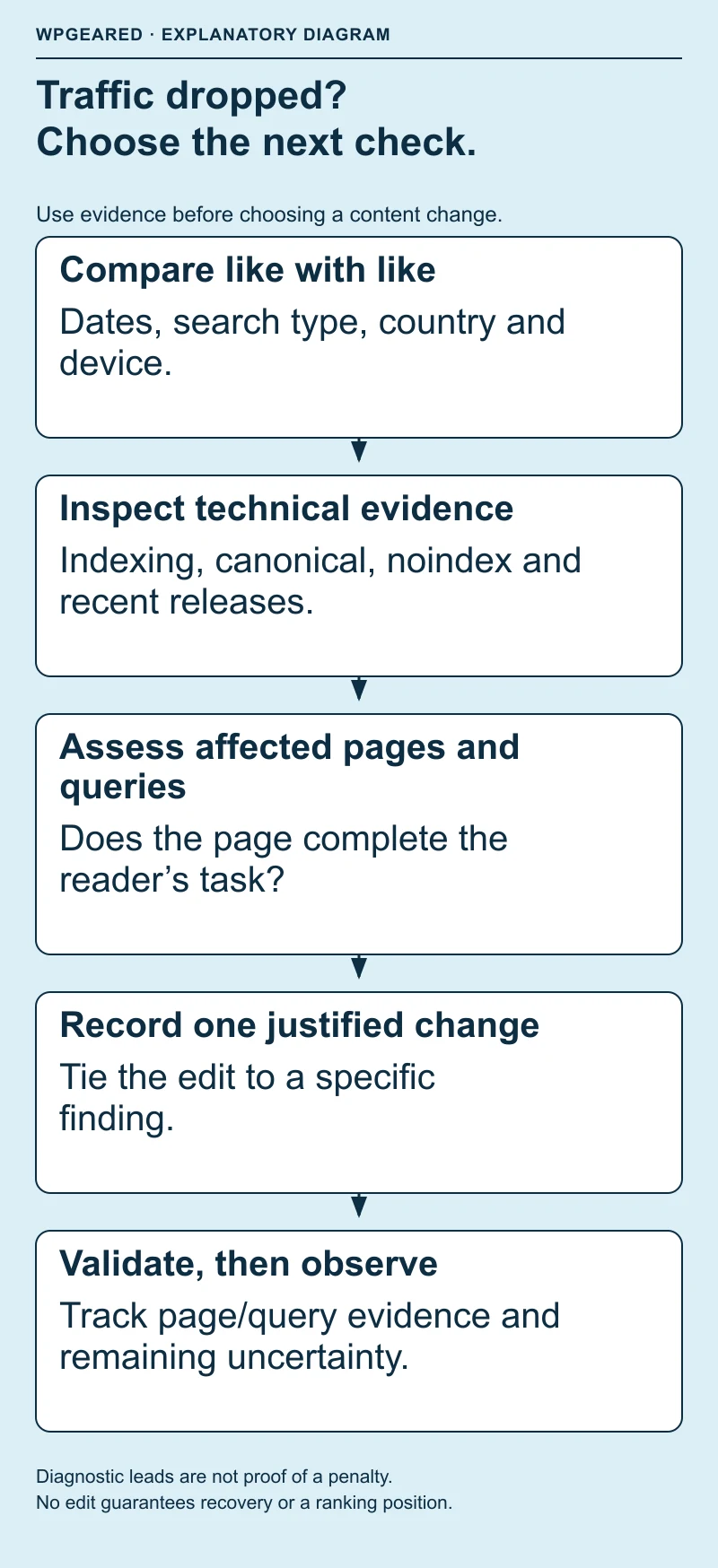
A decline near an update is a reason to investigate, not a diagnosis. Establish what changed and which pages were affected, then assess whether those pages still help readers complete the task they came for.
What changed after the original helpful content updates?
Google's March 2024 announcement described changes involving multiple core systems and new spam policies. Treating every subsequent ranking loss as one standalone “HCU penalty” oversimplifies that change.
Avoid basing a recovery plan on a supposed helpful-content reset or a guaranteed recovery package. Google's core-update guidance does not promise that a particular edit will restore a previous position. Checked November 2026.
Work through the possible causes: a technical problem, a change in search demand or visibility, a mismatch with the searcher's task, or another explanation supported by the data.
1. Establish the dates and compare like with like
Write down when the decline began and when you first noticed it. Those dates may differ, particularly on a site with little search traffic.
Use the Google Search Status Dashboard to check documented incidents and update rollout dates. If you are assessing a core update, Google recommends waiting at least one full week after it finishes before analyzing the change. Use the actual completion date rather than a social-media announcement. Checked November 2026.
In Search Console's search-performance report, compare suitable periods before and after the change. Keep the search type consistent and examine country and device segments where they matter to your audience. Compare similar-length windows, and check the previous year if seasonal interest might explain the difference.
Record a site migration, changed URLs, new theme, robots change or other significant release on the same timeline. Do not assume an update caused a decline that began immediately after your own noindex or routing change.
On a low-volume blog, a handful of searches can produce large percentages. Keep the underlying counts in view. A percentage alone cannot tell you whether you have a persistent sitewide problem.
2. Separate lost clicks from lost visibility
Google's traffic-drop troubleshooting guide recommends investigating different causes rather than treating every decline alike. Start with clicks, impressions and position, then inspect the affected pages and queries. Checked November 2026.
| What the evidence suggests | A useful next check |
|---|---|
| Clicks fall while impressions and positions appear broadly stable | Examine click-through rate, query mix and how the result answers the search. |
| Impressions fall around a seasonal topic | Compare demand across suitable periods before assuming a content-quality problem. |
| Important URLs disappear from indexed results | Inspect indexing, HTTP responses, canonicals and recent configuration changes. |
| Particular page/query pairs lose position consistently | Review their reader task and current competing result formats. |
| Analytics falls but Search Console does not show the same pattern | Check measurement changes before diagnosing a search-ranking loss. |
Use these patterns to choose the next check. Several causes can occur together.
Avoid reading the site's average position as a score for every article. The mix of queries and pages contributing to that average can change. A specific page and relevant query are more useful for deciding what to edit than an isolated sitewide average.
Sort the affected pages by the actual lost traffic and their importance to readers or the business. Include stable pages as a comparison group. Use those comparisons to choose which pages need work.
3. Rule out technical and security problems
Inspect representative affected URLs in Search Console. Compare the reported indexing and canonical information with what the page currently serves. Check for an unintended noindex, inaccessible URL, redirect mistake or changed canonical before commissioning a content overhaul.
Also review Search Console's manual-action and security information. A manual action is a specific reported issue; an ordinary ranking change should not be labeled one without that evidence. Google's traffic-drop documentation identifies technical and security problems among the possible causes.
Look at your own release and maintenance records. A pattern affecting a template or directory may have a different explanation from a change confined to one topic. Use the WordPress maintenance checklist to review relevant operational checks without turning this investigation into random plugin changes.
If search results contain unfamiliar Japanese phrases or pages your team did not publish, investigate the matching symptoms with the Japanese keyword hack guide. Do not rewrite legitimate content to compensate for an unresolved compromise.
Fix a demonstrated technical issue first, verify the affected URLs again, and record that change. You can then judge remaining content questions with less uncertainty.
4. Assess whether the article completes the reader's task
Choose a small representative group of genuinely affected pages. Five can be a manageable starting batch, but that is a cost-control recommendation, not a Google rule.
For each page, write one sentence describing what the visitor needs to do. Then read the page as someone trying to finish that task. A tutorial can be long, well formatted and still fail because a crucial setting changed or the reader never reaches a working result.
Use Google's people-first content questions to assess useful information, completeness and trustworthiness. Checked November 2026. In practical terms, ask:
- Does the opening answer the question the title promises to answer?
- Can a reader follow the steps with the prerequisites stated?
- Are recommendations supported by current, appropriate sources?
- Does the page add a usable explanation, example or decision that a summary of other pages would not provide?
- Are limitations clear enough to prevent the wrong reader from applying the instructions?
- Is experience described only where it actually exists?
Compare the current search-result formats for the relevant query. If visitors need a calculation, a tool may satisfy the task better than an essay. If they need a short settings procedure, adding a long history will not fix the missing steps. Do not copy competing pages; identify the task your page has left incomplete.
5. Make changes tied to a finding
Turn each finding into a specific action. Replace an obsolete setup branch, add a missing verification step, remove an unsupported claim or consolidate two pages that genuinely answer the same task.
Preserve useful sections. Rewriting everything at once increases the review work and makes it harder to tell which problem you solved. A broad rewrite is justified when the article's whole premise is wrong, not simply because traffic declined.
Google's content guidance rejects a preferred word-count formula and cosmetic date changes without substantive improvement. Aim for a complete answer. Do not add paragraphs or change the date just to make a page look refreshed. Checked November 2026.
Similarly, mass deletion is not a default recovery strategy. Assess whether content is inaccurate, duplicated, unsupported or genuinely unnecessary before removing it. Google's core-update guidance encourages substantive assessment rather than quick fixes. Keep URL and redirect decisions tied to the reader's destination.
6. Keep a change log and decide what to observe next
Use a worksheet like this for each affected article:
| Field | What to record |
|---|---|
| URL and reader task | The exact page and the question it should answer |
| Comparison windows | Before and after dates, search type and relevant segments |
| Evidence | Page/query observations and supporting inspection results |
| Technical finding | Confirmed issue, ruled-out issue or remaining uncertainty |
| Reader obstacle | The specific gap that prevents a useful result |
| Change | The edit or repair made and its reason |
| Validation | How you checked that the new instructions or page work |
| Next review | When to reassess and what evidence would change your decision |
For example, a hypothetical mailbox guide might have correct indexing but instructions for a retired import feature. Its content change would replace that branch with a current supported setup and a send-and-receive check. That is an example of a defensible improvement, not evidence that such an edit produces a ranking gain.
For broader technical findings, use the technical SEO audit workbook. Keep the diagnosis and work record together so you can see what you have already checked.
How long should you wait for recovery?
There is no promised recovery deadline. Google's core-update guidance, checked November 2026, explains that improvements can take days to several months to be reflected, and useful changes are not recognized only during major core updates. A previous ranking may not return.
Separate validation from search outcomes. You can verify that a broken procedure now works or an accidental noindex has been removed. More impressions, clicks and qualified inquiries are later observations, not proof built into the edit.
If the data still does not identify a likely cause, keep that uncertainty in the record. A focused technical SEO audit can investigate a defined problem; it should not be sold or purchased as a guaranteed HCU reversal.